---
title: "Showroom Bottrop (10) - Prepare warping - Blog - VIER IM POTT"
description: "After adjusting projectors we can start with configuration of the visual. (Apologize screens in German language).We know that there are probably much better tutorials out there but we decided to publish our way. Maybe it's helpful for some of you.Imp"
url: "https://vier-im-pott.com/en/blog/showroom-bottrop-10"
date: "2026-05-02T15:15:46+00:00"
language: "en-GB"
---
[](https://vier-im-pott.com/)
[](#)- [Commercial](https://vier-im-pott.com/en/commercial/entertainment-and-flight-training)
- [Entertainment and Flight Experience](https://vier-im-pott.com/en/commercial/entertainment-and-flight-training)
- [Images and Videos](https://vier-im-pott.com/en/commercial/entertainment-and-flight-training#impressions)
- [Examples](https://vier-im-pott.com/en/commercial/entertainment-and-flight-training#examples)
- [Non-Qualified Flight Training](https://vier-im-pott.com/en/commercial/entertainment-and-flight-training#non-qualified-flight-training)
- [Upgrade to FNPTII + MCC or FTD1](https://vier-im-pott.com/en/commercial/entertainment-and-flight-training#upgrade-to-fnpt-ftd)
- [References](https://vier-im-pott.com/en/commercial/entertainment-and-flight-training#references)
- [Private](https://vier-im-pott.com/en/private/premium-plug-fly)
- [Premium Plug & Fly](https://vier-im-pott.com/en/private/premium-plug-fly)
- [Benefits](https://vier-im-pott.com/en/private/premium-plug-fly#benefits)
- [Example Configurations](https://vier-im-pott.com/en/private/premium-plug-fly#examples)
- [Images and Videos](https://vier-im-pott.com/en/private/premium-plug-fly#images-and-videos)
- [References](https://vier-im-pott.com/en/private/premium-plug-fly#references)
- [Product Finder](https://vier-im-pott.com/en/productfinder)
- [Builder](https://vier-im-pott.com/en/cockpit-builder/cockpit-builders)
- [Cockpit Builders](https://vier-im-pott.com/en/cockpit-builder/cockpit-builders)
- [Examples](https://vier-im-pott.com/en/cockpit-builder/cockpit-builders#examples)
- [Shop](https://vier-im-pott.com/en/shop)
- [Homecockpit Configurator ](https://vier-im-pott.com/en/productfinder)
- [Image Gallery](https://vier-im-pott.com/en/cockpit-builder/cockpit-builders#image-gallery)
- [References](https://vier-im-pott.com/en/cockpit-builder/cockpit-builders#references)
- [Documentation](https://vier-im-pott.com/en/members-lounge)
- [Assembly Instructions](https://vier-im-pott.com/en/members-lounge)
- [Cockpit Planning](https://vier-im-pott.com/en/members-lounge/how-to-plan-your-flight-simulator-cockpit)
- [Tutorials](https://vier-im-pott.com/en/members-lounge/cockpit-building-tutorials)
- [Success Stories](https://vier-im-pott.com/en/members-lounge/user-stories)
- [Service](https://vier-im-pott.com/en/members-lounge/support)
- [How we deliver](https://vier-im-pott.com/en/members-lounge/how-we-deliver-our-products)
- [Blog](https://vier-im-pott.com/en/blog)
- [About](https://vier-im-pott.com/en/about)
- [Contact](https://vier-im-pott.com/en/contact)
- [](https://vier-im-pott.com/en/checkout/checkout/layout-show)
- [](https://vier-im-pott.com/en/search)
# VIER IM POTT Blog
Flight simulation products, practical guidance, tips, and hands-on experience.
[ Categories: All Categories ](https://www.vier-im-pott.com/javascript:void(0); "Categories")
Search...Suggested keywords
[ x ](https://www.vier-im-pott.com/javascript:void(0);)
# Showroom Bottrop (10) - Prepare warping
Thursday, 15 June 2017
After adjusting projectors we can start with configuration of the visual. (Apologize screens in German language).
We know that there are probably much better tutorials out there but we decided to publish our way. Maybe it's helpful for some of you.
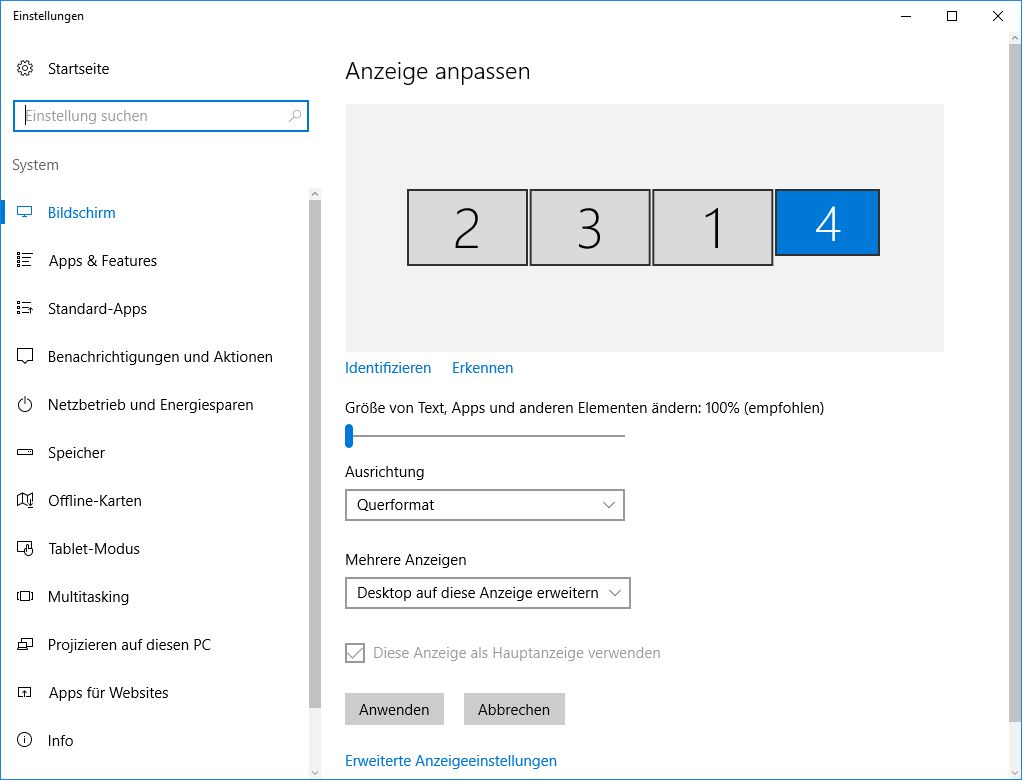
**Important: As we learnd you should use separate screens. In our case screen 2, 3 and 1. Display 4 is our maintenance computer. Do not use nVidia surround in combination with P3D.**
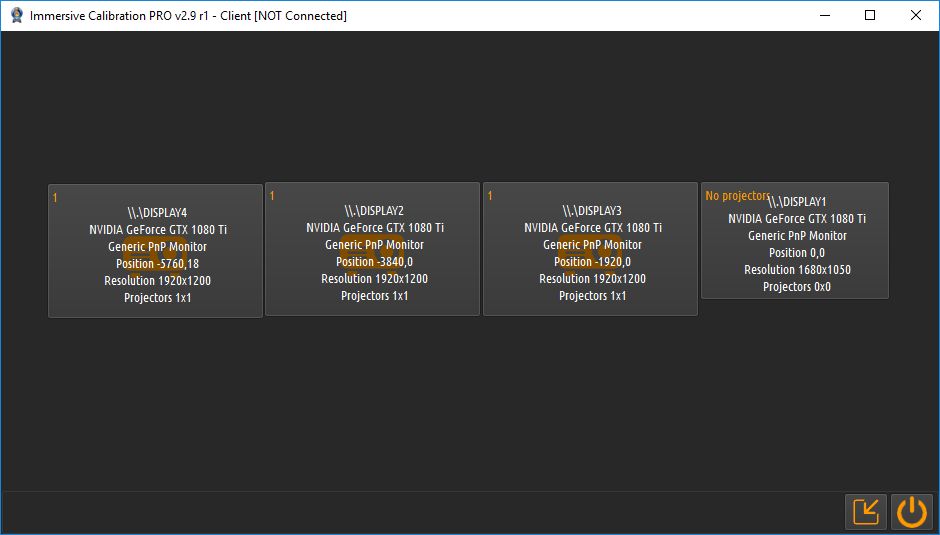
We will user Fly-Elise Immersive Calibration PRO to prepare warping and edge blending.
First we start the client.exe and select three times 1 x 1 projectors. Of course not for our maintenance display.
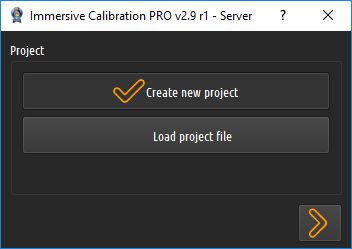
Then we start Immersive Calibration PRO Server and create a new project.
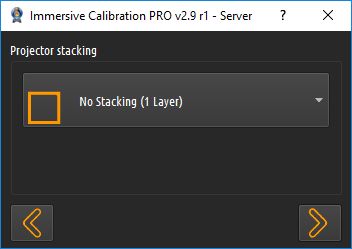
As we have three projectors in one row we select "No Stacking".
Our screen is curved like a horseshoe. So - surprise, surprise - we choose "Horseshoe" **and "Map on projector"**
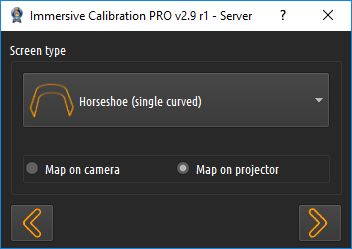
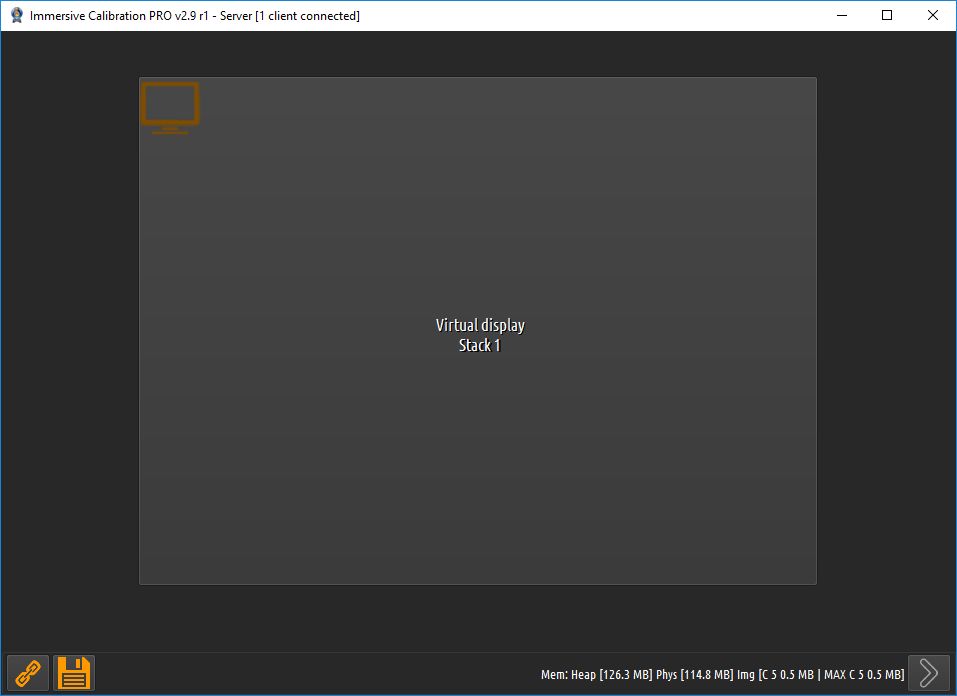
In the next steps we choose the right combination of projectors (3 x 1)m, correct native solution and match remote projectors with our combination. In our case -5760 is left, 3840 is the center projector and 1920 is the right projector.
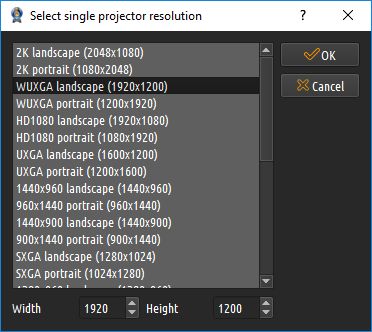
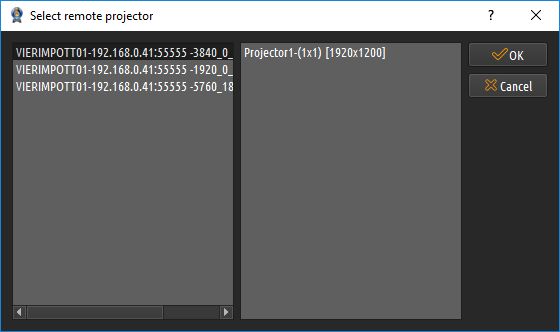
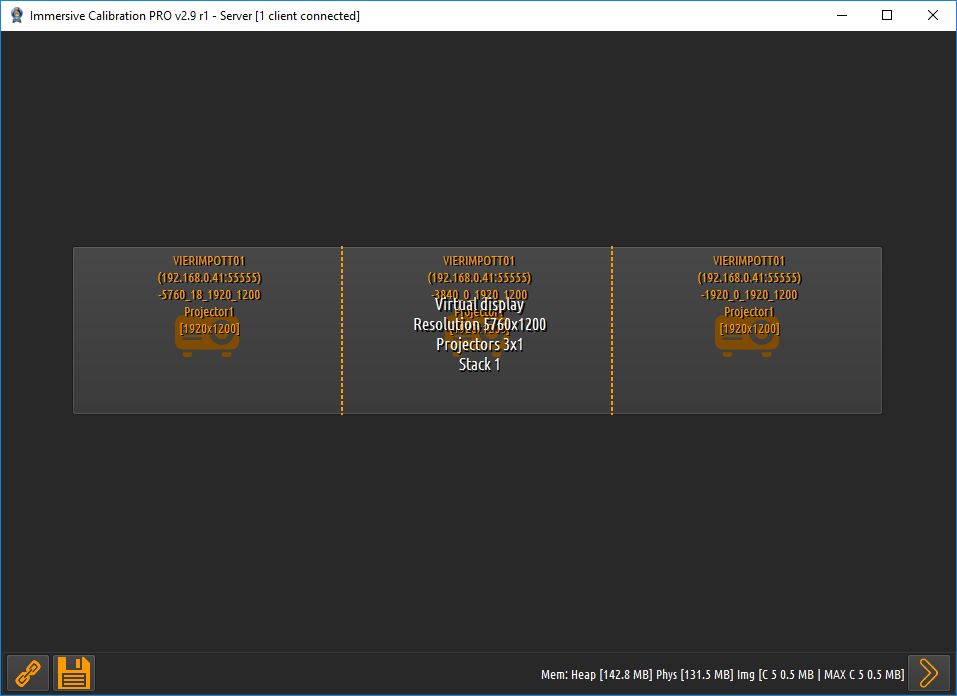
So. Now we are ready to do the major adjustments.
[ Showroom Bottrop (12) - Carpet and shell frame ](https://vier-im-pott.com/en/blog/showroom-bottrop-12)
[ Showroom Bottrop (7) - Technical ideas ](https://vier-im-pott.com/en/blog/showroom-bottrop-7)
#### Comments
No comments made yet. Be the first to submit a comment
[  ](https://www.vier-im-pott.com/javascript:void(0);)
Saturday, 02 May 2026
I have read and agreed to the [Terms & Conditions](https://www.vier-im-pott.com/javascript:void(0);)
### Stay informed
We will be happy to inform you about news.
[Subscribe to our blog](https://www.vier-im-pott.com/javascript:void(0);) [Unsubscribe from our blog](https://www.vier-im-pott.com/javascript:void(0);)
### Company
**VIER IM POTT** Jähne GmbH für Produktinnovation
Freiberger Straße 114, 01159 Dresden
Germany
Phone: [+49 351 4116349](tel:+493514116349)
Email:
Opening hours: Mon - Fri 08:00 - 17:00
### Showroom
Our showroom in Bottrop, NRW is open for private and business customers. We look forward to your visit.
To test our products, please make an appointment.
### Social Media
[Facebook](https://www.facebook.com/vierimpott/)
[Instagram](https://www.instagram.com/vierimpott/)
[YouTube](https://www.youtube.com/@vierimpott)
[LinkedIn](https://www.linkedin.com/company/vier-im-pott)
[X (Twitter)](https://twitter.com/vierimpott)
### Legal
[Imprint](https://www.vier-im-pott.com/index.php?option=com_sppagebuilder&view=page&id=9&Itemid=167)
[Terms and Conditions](https://www.vier-im-pott.com/index.php?option=com_sppagebuilder&view=page&id=10&Itemid=168)
[Data Privacy Agreement](https://www.vier-im-pott.com/index.php?option=com_sppagebuilder&view=page&id=8&Itemid=169)
VIER IM POTT products are in no way affiliated or endorsed by the aircraft manufacturers. Our simulation products are no genuine aircraft manufacturer parts and cannot be used for professional flight training. They functionally resemble the real parts, that cannot be used in a real aircraft and should only be used for simulation purposes.
© 2026 VIER IM POTT - Made in Germany with Leidenschaft
- [  DE ](https://vier-im-pott.com/de/blog/showroom-bottrop-10)
- [  EN ](https://vier-im-pott.com/en/blog/showroom-bottrop-10)
[](#) Search
- [ Commercial](https://vier-im-pott.com/en/commercial/entertainment-and-flight-training)
- [ Entertainment and Flight Experience](https://vier-im-pott.com/en/commercial/entertainment-and-flight-training)
- [ Images and Videos](https://vier-im-pott.com/en/commercial/entertainment-and-flight-training#impressions)
- [ Examples](https://vier-im-pott.com/en/commercial/entertainment-and-flight-training#examples)
- [ Non-Qualified Flight Training](https://vier-im-pott.com/en/commercial/entertainment-and-flight-training#non-qualified-flight-training)
- [ Upgrade to FNPTII + MCC or FTD1](https://vier-im-pott.com/en/commercial/entertainment-and-flight-training#upgrade-to-fnpt-ftd)
- [ References](https://vier-im-pott.com/en/commercial/entertainment-and-flight-training#references)
- [ Private](https://vier-im-pott.com/en/private/premium-plug-fly)
- [ Premium Plug & Fly](https://vier-im-pott.com/en/private/premium-plug-fly)
- [ Benefits](https://vier-im-pott.com/en/private/premium-plug-fly#benefits)
- [ Example Configurations](https://vier-im-pott.com/en/private/premium-plug-fly#examples)
- [ Images and Videos](https://vier-im-pott.com/en/private/premium-plug-fly#images-and-videos)
- [ References](https://vier-im-pott.com/en/private/premium-plug-fly#references)
- [ Product Finder](https://vier-im-pott.com/en/productfinder)
- [ Builder](https://vier-im-pott.com/en/cockpit-builder/cockpit-builders)
- [ Cockpit Builders](https://vier-im-pott.com/en/cockpit-builder/cockpit-builders)
- [ Examples](https://vier-im-pott.com/en/cockpit-builder/cockpit-builders#examples)
- [ Shop](https://vier-im-pott.com/en/shop)
- [ Homecockpit Configurator ](https://vier-im-pott.com/en/productfinder)
- [ Image Gallery](https://vier-im-pott.com/en/cockpit-builder/cockpit-builders#image-gallery)
- [ References](https://vier-im-pott.com/en/cockpit-builder/cockpit-builders#references)
- [ Documentation](https://vier-im-pott.com/en/members-lounge)
- [ Assembly Instructions](https://vier-im-pott.com/en/members-lounge)
- [ Cockpit Planning](https://vier-im-pott.com/en/members-lounge/how-to-plan-your-flight-simulator-cockpit)
- [ Tutorials](https://vier-im-pott.com/en/members-lounge/cockpit-building-tutorials)
- [ Success Stories](https://vier-im-pott.com/en/members-lounge/user-stories)
- [ Service](https://vier-im-pott.com/en/members-lounge/support)
- [ How we deliver](https://vier-im-pott.com/en/members-lounge/how-we-deliver-our-products)
- [ Blog](https://vier-im-pott.com/en/blog)
- [ About](https://vier-im-pott.com/en/about)
- [ Contact](https://vier-im-pott.com/en/contact)
- [ My Account](https://vier-im-pott.com/en/checkout/checkout/layout-show)
- [ Search](https://vier-im-pott.com/en/search)
[Online-Shop](https://vier-im-pott.com/en/shop)
[Productfinder](https://vier-im-pott.com/en/productfinder)
[ WhatsApp](https://api.whatsapp.com/send?phone=493514116349&text=)
We will try to answer within 24 hours.
[](https://www.vier-im-pott.com/javascript:void(0))
## Schema
```json
{
"@context": "https://schema.org",
"@type": "BreadcrumbList",
"itemListElement": [
{
"@type": "ListItem",
"position": 1,
"name": "Home",
"item": "https://vier-im-pott.com/en"
},
{
"@type": "ListItem",
"position": 2,
"name": "Blog",
"item": "https://vier-im-pott.com/en/blog"
},
{
"@type": "ListItem",
"position": 3,
"name": "Christian Behne",
"item": "https://www.vier-im-pott.com/en/blog/blogger/christian-behne"
},
{
"@type": "ListItem",
"position": 4,
"name": "Showroom Bottrop (10) - Prepare warping",
"item": "https://vier-im-pott.com/en/blog/showroom-bottrop-10"
}
]
}
```
```json
{
"@context": "https://schema.org",
"@type": "TechArticle",
"mainEntityOfPage": {
"@type": "WebPage",
"@id": "https://vier-im-pott.com/en/blog/showroom-bottrop-10"
},
"headline": "Showroom Bottrop (10) - Prepare warping",
"description": "After adjusting projectors we can start with configuration of the visual. (Apologize screens in German language).We know that there are probably much better tutorials out there but we decided to publish our way. Maybe it's helpful for some of you.Important: As we learnd you should use separate screens. In our case screen 2, 3 and 1. Display 4 is our maintenance computer. Do not use nVidia surround in combination with P3D. We will user Fly-Elise Immersive Calibration PRO to prepare warping and edge blending.",
"image": {
"@type": "ImageObject",
"url": "https://www.vier-im-pott.com/components/com_easyblog/themes/wireframe/images/placeholder-image.png"
},
"publisher": {
"@type": "Organization",
"name": "VIER IM POTT Premium Flight Simulators",
"logo": {
"@type": "ImageObject",
"url": "https://www.vier-im-pott.com/images/logo_2024_0f4e7d.png"
}
},
"author": {
"@type": "Person",
"name": "Christian Behne",
"url": "https://vier-im-pott.com/en/blog/showroom-bottrop-10"
},
"datePublished": "2017-06-15T18:04:55+00:00",
"dateCreated": "2017-05-25T18:18:13+00:00",
"dateModified": "2023-04-29T14:53:54+00:00"
}
```